


About
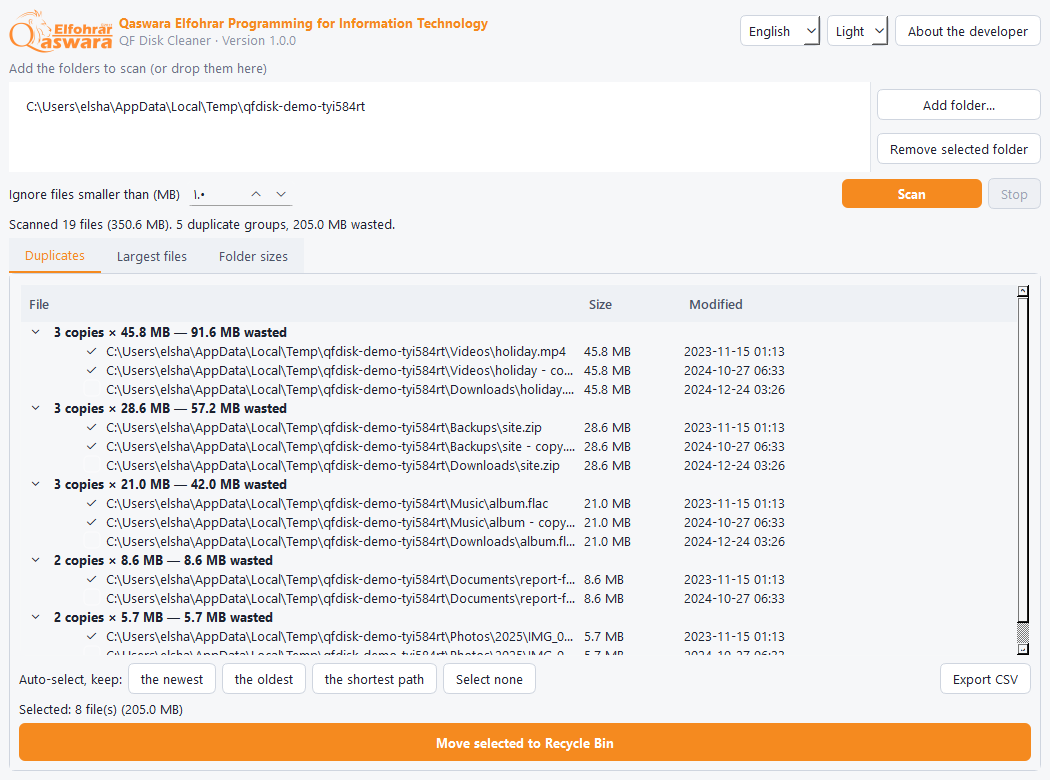
A portable program that scans the folders you choose and shows files that are duplicates by content (not just by name), the largest files, and the folders taking the most disk space.
Nothing is permanently deleted: everything you remove goes to the Recycle Bin and can be restored, and every duplicate group keeps at least one copy. Everything runs on your PC.
Features
- Duplicates by content: it compares size, then the first part, then a full SHA-256, so different files are never treated as duplicates
- One-click auto-select: keep the newest, the oldest or the shortest path, with a review before deleting
- Safe: Recycle Bin only, it is impossible to delete every copy of a duplicate, and a confirmation shows the number of files and the space
- The 300 largest files in the scanned folders, with a double-click to show them in Explorer
- Folder sizes in detail (depth 1 to 4) with each folder's share of the total
- Does not follow junctions (no loops, nothing counted twice) and handles Arabic file names
- Stop the scan any time, and export the duplicates list as CSV that opens correctly in Excel
- Arabic (right-to-left), English and French, dark and light themes, a single portable EXE
How to install
- Download the EXE (or the ZIP) and run QFDisk.exe directly, no install.
- If "Windows protected your PC" appears, click More info then Run anyway. It shows for any new program that is not code-signed yet.
- Add the folders (or drop them on the program) and press Scan.
Release notes
Version 1.0.09 Nov 2026
- First release: duplicates, largest files, folder sizes, safe Recycle Bin removal, in three languages
FAQ
Can it delete important files by mistake?
It never deletes permanently: everything goes to the Recycle Bin and can be restored, and at least one copy of each duplicate always stays. Review the list before confirming.
Two files with the same name were not shown?
It compares content, not names. Two files with the same name but different content are not duplicates.
The scan is slow?
It only hashes files that share the same size. Raise "Ignore files smaller than" to speed up a big disk.