


About
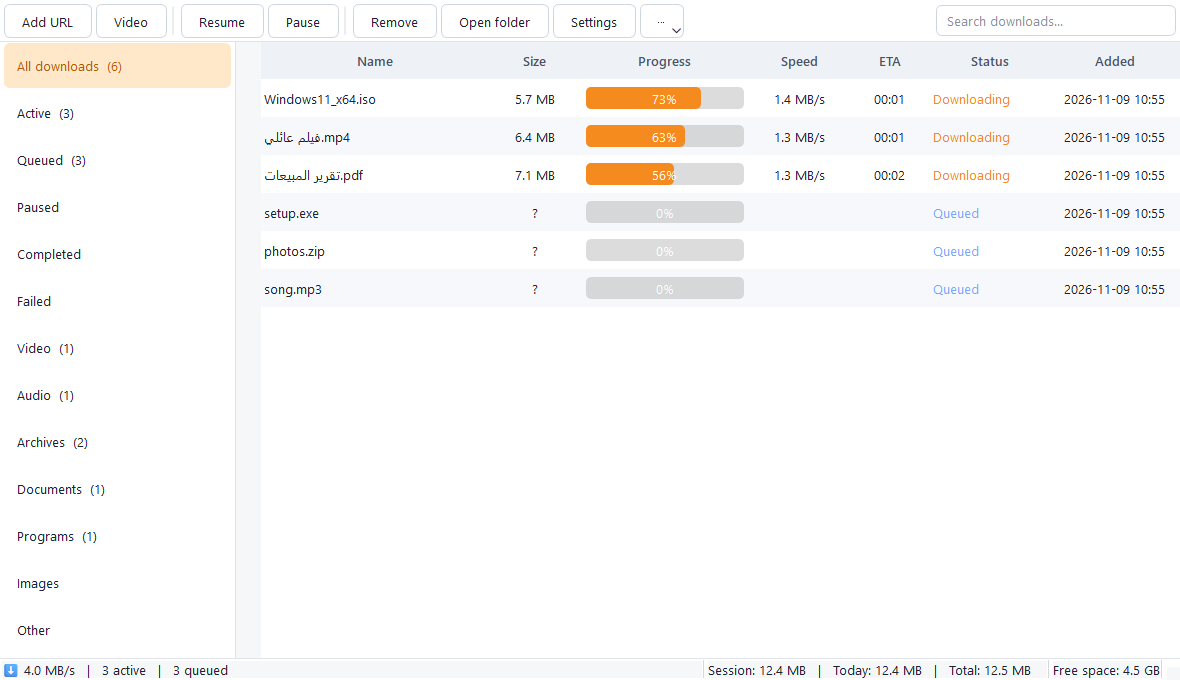
A download manager that splits each file over several connections (1 to 32) to speed it up, and continues where it stopped if your internet drops or you close the program. No ads, no tracking.
It downloads video and audio from sources that allow it (such as YouTube) in the quality you pick, as MP4, WebM or MP3, and works with Chrome and Edge through a small extension. It does not bypass DRM or platform restrictions.
Features
- Split a file over 1 – 32 connections; it checks that the server supports resuming before relying on it
- Pause and resume, even after closing the program or losing the connection, with automatic retries
- Verifies the file size (and an optional SHA-256) before accepting the final file
- Video and audio: 360p up to 4K, MP4 / WebM, MP3 extraction and playlists
- Chrome and Edge extension: right-click any link, or capture downloads after you confirm
- Automatic sorting into a folder per file type, search, filters and history export
- Download queue and scheduling at a set time or a daily window, speed limit and a resource saver mode
- Disk space watch: a warning before downloading and an automatic pause when the disk is nearly full
- Dark and light themes in Arabic (right-to-left), English and French, tray icon and notifications
- Safe updates: the update's SHA-256 is verified before it runs
How to install
- Download the installer, open it and click Next until it finishes.
- If "Windows protected your PC" appears, click More info then Run anyway. It shows for any new program that is not code-signed yet.
- For Chrome / Edge: open chrome://extensions, turn on Developer mode, choose "Load unpacked" and pick the extension folder inside the program folder (Settings > Browser opens it for you).
- Portable edition: unzip it into any folder and run QFDownloadManager.exe.
Release notes
- Added French to the program and the extension, plus interface polish
- First release: multi-connection downloads with resume, video and audio downloads, Chrome/Edge extension, queue and scheduling, automatic sorting, Arabic/English interface
FAQ
Can it download any video?
No. It downloads only content that may be downloaded and does not bypass DRM or logins. If a link is unsupported it tells you why.
Why does a file download with one connection only?
Some servers do not support splitting or resuming. The program detects this, tells you, and downloads the file over one connection.
The link expired halfway?
Right-click the download, choose "Refresh link" and paste the new link: it continues from the saved part if it is the same file.
How do I uninstall it?
From Windows Settings > Apps. The uninstaller asks whether to delete the list and settings; your downloaded files are never deleted.